Scriptly Helps Pharmacies Identify Trends in Real Time with Reveal

Explore the complete guide to embedded analytics, including architecture, security, AI capabilities, implementation patterns, and evaluation criteria for modern applications.
Read Now
Fully branded white label dashboards offer custom personalization so that your customers can present a holistic service that is all branded to one company.
Read Now Learn what an analytics SDK is and how to choose the right one for your SaaS product. See what to look for to scale without constraints.
Executive Summary:
Key Takeaways:
Most teams underestimate what it takes to deliver analytics as a product.
What starts as simple dashboards quickly turns into data infrastructure, permissions, performance, and UX complexity. This is where most custom-built analytics efforts break down.
Users expect to see and act on their data without leaving the application. When analytics is missing or disconnected, adoption drops, and users turn to external tools. That pressure pushes teams to bring analytics into the core product experience.
The problem is that what looks simple expands fast. Teams run into data pipelines, permission logic, and front-end work that slows delivery.
This is where an analytics SDK changes the approach. Instead of building everything from scratch, teams integrate analytics directly into the product and move faster without losing control.
An analytics SDK is a set of developer tools that lets SaaS teams embed dashboards, reporting, and data exploration directly into their product.
It acts as a bridge between your data, your application, and your users, handling how analytics is delivered, displayed, and controlled.
Instead of building analytics from scratch, developers integrate a pre-built layer that handles data visualization, user interaction, and access control inside the application.
A typical analytics SDK includes:
Dashboard and visualization components
Data connectivity across multiple data sources
APIs for customization and control
User interactions such as filtering and drilldowns
These components run inside your application and align with your architecture. Analytics becomes part of the product, not a separate layer.
Not all solutions work the same way.
Some limit how you can integrate or customize analytics. Others introduce constraints that only show up at scale, when changes become expensive and harder to manage.
Teams rarely start by choosing an analytics SDK. They start by trying to add dashboards to their product as quickly as possible. This usually leads to three approaches: iFrames, APIs, or an SDK, each coming with different trade-offs.
| Approach | Control | UX | Dev Effort | Best For |
|---|---|---|---|---|
| iFrame | Low | Poor | Low | Small teams with limited budget and simple analytics needs |
| API | High | Custom | High | Teams building a fully custom analytics experience with dedicated engineering resources |
| SDK | High | Native | Medium | SaaS products embedding analytics with full control and faster delivery |
The fastest to implement, but limited:
Minimal customization
Disconnected user experience
Little control over interactions
Provides full control, but shifts all responsibility to your team:
Requires building dashboards and interactions from scratch
Ongoing maintenance and complexity
Slower long-term delivery
Balances speed and control:
Prebuilt components with customization
Native integration into your product
Faster delivery without sacrificing flexibility
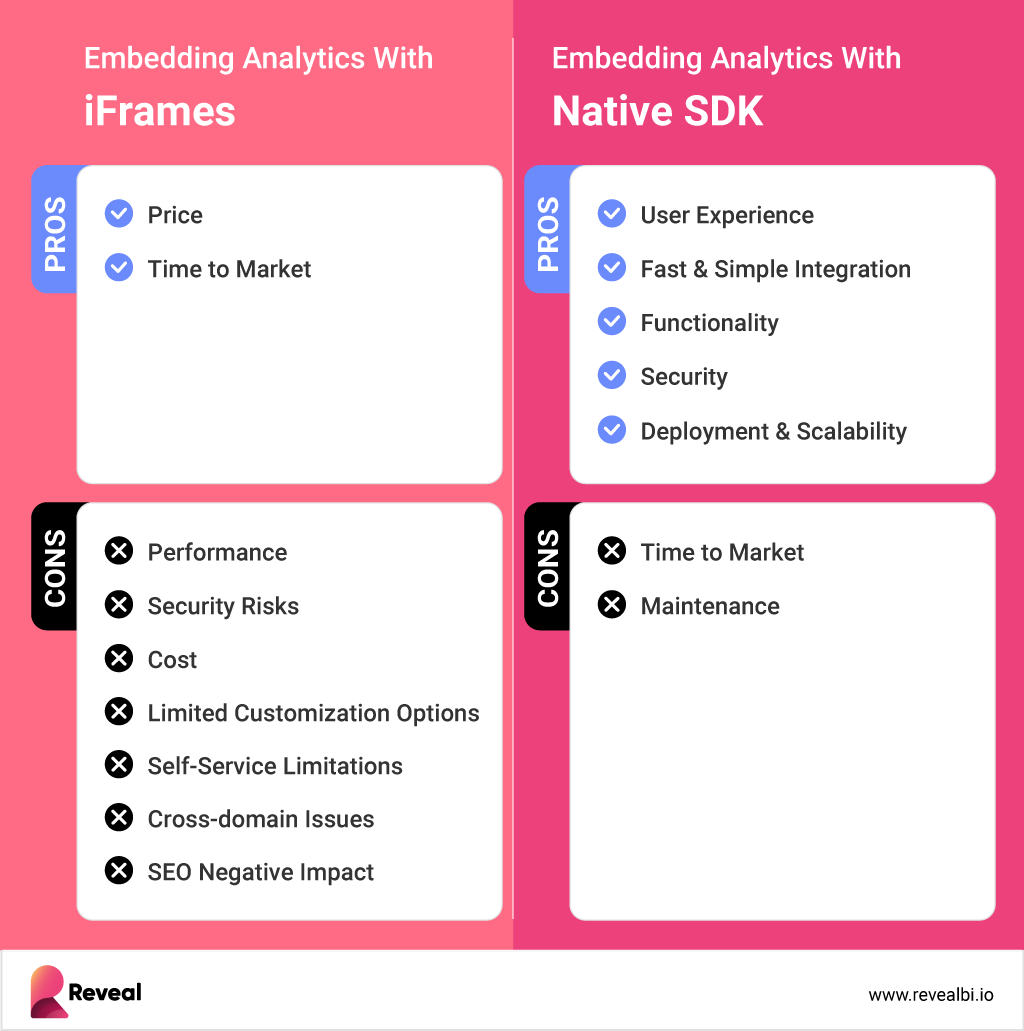
As analytics becomes part of the product experience, most SaaS teams move toward SDK-based approaches to avoid the trade-offs of both extremes. The differences become clearer when comparing embedded analytics vs. iFrames in real product scenarios.
Analytics inside a product is not just a visual layer. Every interaction depends on how data is accessed, secured, and delivered in real time. An analytics SDK brings these pieces together inside your application so teams can control how analytics behaves from end to end.
On the client side, the SDK handles everything users see and interact with:
Dashboards and visualizations rendered inside your UI
Filters and drilldowns for user interaction
Real-time updates based on user input
This layer ensures analytics feels like a native part of the product, not an external tool.
On the server side, the SDK manages how data is accessed and delivered:
Queries executed against your data sources
Permission logic applied per user
Performance optimized for real-time responses
This layer connects analytics to your data sources and enforces the same rules as the rest of your application.
These layers communicate through APIs that control how data moves and how interactions behave. Developers can shape the experience without rebuilding the full analytics stack. This gives teams flexibility while maintaining architectural consistency.
For SaaS teams, this model makes embedded analytics easier to scale across applications. Analytics stays aligned with your product, and teams avoid the overhead of building and maintaining the entire system.
At some point, every SaaS team hits the same wall. Analytics starts as a feature but quickly becomes an infrastructure that must scale across customers, data sets, and use cases.
What changes is not just scale, but expectations:
Tenant-level data isolation per customer
Performance under larger datasets
Flexible delivery across use cases
A seamless, in-product experience
Most teams underestimate how fast this shift happens.
They launch a few dashboards, then customers ask for access. Permissions, performance, and scalability quickly turn into ongoing work. At that point, analytics stops being a feature. It becomes something you have to maintain.
An analytics SDK gives teams a structured way to handle this. Instead of rebuilding logic for each use case, they work with a consistent layer that adapts to the product.
Datacom is a clear example. The team used Reveal to embed analytics into their platform, giving users real-time visibility without leaving the application. This allowed them to scale analytics without increasing development overhead.
Teams evaluating an analytics SDK often focus on the embedded analytics features list. At first glance, most platforms look similar. Dashboards, integrations, and setup appear comparable.
The differences show up during real implementation.
Common limitations include:
Limited framework support: Some tools support only one framework, forcing teams to adjust their stack or introduce inconsistencies
Partial SDKs: Many rely heavily on APIs, so developers still need to build key parts of the analytics experience
Integration constraints: Analytics behaves like a separate system instead of a native part of the product
Scaling challenges: Performance, multi-tenancy, and data complexity become difficult to manage over time
These issues rarely appear in early demos. They surface when analytics becomes part of the core product and needs to scale across teams, applications, and customers. This is when embedded analytics flexibility becomes a deciding factor.
SaaS companies rarely operate on a single framework. As products grow and teams expand across regions, each team uses different technologies based on expertise and availability.
One application built in Angular by a US team
Another product developed in React by a European team
A third system running on Blazor for .NET workloads
Teams choose frameworks based on hiring availability, existing systems, and delivery speed. Over time, this creates a multi-framework environment across the product.
Most analytics SDK tools break in this environment. They force a single framework or limit how analytics can be integrated across applications. This creates friction between teams and slows delivery.
Teams adopt frameworks they do not use
Applications get rewritten to match the SDK
Analytics behaves differently across products
Teams end up adapting their product to fit the analytics layer. This creates inefficiencies and slows how quickly new features ship.
Your analytics SDK should adapt to your architecture, not dictate it. For SaaS teams working across multiple applications, flexibility determines whether analytics scales or needs to be rebuilt for each product.
Modern analytics SDKs support multiple frameworks by separating the analytics engine from the front-end. Instead of forcing a single stack, they provide a consistent backend layer that works across different frameworks.
Platforms like Reveal support this through:
Native SDKs for React, Angular, Blazor, .NET, Web Components, jQuery, and JavaScript
A shared analytics engine for queries, data processing, and rendering
A consistent API layer across all frameworks
Reusable dashboards and business logic across applications
Teams work within their preferred frameworks
Front-end stacks stay unchanged
Analytics stays consistent across products
No need to rebuild analytics for each application
For SaaS teams, this removes a major source of friction. Teams avoid standardizing on a single framework and still deliver a consistent analytics experience across multiple products.
One analytics layer supports multiple applications and teams
Development stays flexible across regions and stacks
Teams avoid duplicated work and reimplementation
Supporting embedding alone is not enough. An analytics SDK must support multiple frameworks in a way that aligns with how SaaS products are built.
AI changes how users interact with data. Instead of building reports, users can query data directly, generate insights, and even create AI-generated dashboards from a single prompt. This reduces manual work and brings analytics closer to everyday workflows, which is why more teams are adopting AI-powered analytics inside their products.

An analytics SDK must go beyond visualization to support this. It needs to handle:
Natural language queries mapped to your data model
Context awareness across users, dashboards, and data
Permission enforcement at every interaction
Efficient processing to control AI token cost and usage
These requirements introduce real constraints. AI must operate within your data boundaries, follow your permission model, and scale without unpredictably increasing costs.
If not, teams lose control over both data access and spend.
Most platforms are not built this way. They add AI analytics features on top of existing systems, which creates gaps in security, control, and cost management.
The decision isn’t whether to use an analytics SDK, but which one can scale with your product. The wrong choice introduces constraints that only appear as your product grows.
Start with these key factors:
1. Build vs Buy
Building an analytics layer gives full control, but it requires at least $350,000 investment, more than seven months to build, and ongoing investment in data pipelines, a dedicated team, permissions, and front-end components. Buying an analytics SDK reduces development effort and speeds up delivery, but only if the solution fits your architecture.
2. Native Integration (No iFrames)
The SDK should provide native components inside your application. iFrames limit customization and create a disconnected experience.
3. Multi-Framework Support
Support for frameworks like React, Angular, and Blazor allows teams to work with their existing stack without friction.
4. Customization and Control
Analytics should match your product. A white-label analytics SDK should give control over UI, interactions, and data presentation.
5. Performance and Scalability
Analytics must handle growing data and usage without slowing down. Look for real-time performance at scale.
6. Security and Deployment Flexibility
You should control where data is processed, including cloud and on-prem analytics environments.
7. Data Connectivity
The SDK should connect to a wide range of data sources and integrate with your existing systems.
A strong solution fits your architecture, supports your team, and scales with your product without introducing limitations.
Most tools force teams to adapt their product to the analytics layer. Reveal takes the opposite approach. It fits your architecture, not the other way around.
Reveal supports modern SaaS environments through:
Native SDKs for React, Angular, Blazor, .NET, Web Components, jQuery, and JavaScript
A shared analytics engine that keeps logic consistent across applications
Reusable dashboards and business logic across products
A consistent API layer across frameworks
Full white-label analytics with control over UI, branding, and user experience
This lets teams use one solution across multiple applications without standardizing on a single framework. Each team works with its own stack, while analytics stays consistent across the product.
The impact is immediate:
No need to rewrite applications
Less dependency between teams
Faster feature delivery
Reveal also supports AI inside the analytics layer. Teams can enable AI analytics, including natural language queries and AI-generated dashboards, while keeping control over permissions, data access, and cost.
Deployment follows the same model. Teams can run Reveal in cloud, hybrid, or on-prem analytics environments based on their requirements.
For SaaS teams operating across multiple products and regions, Reveal adapts to the product instead of limiting it.


 Return to Blog


 ChatGPT
 Perplexity