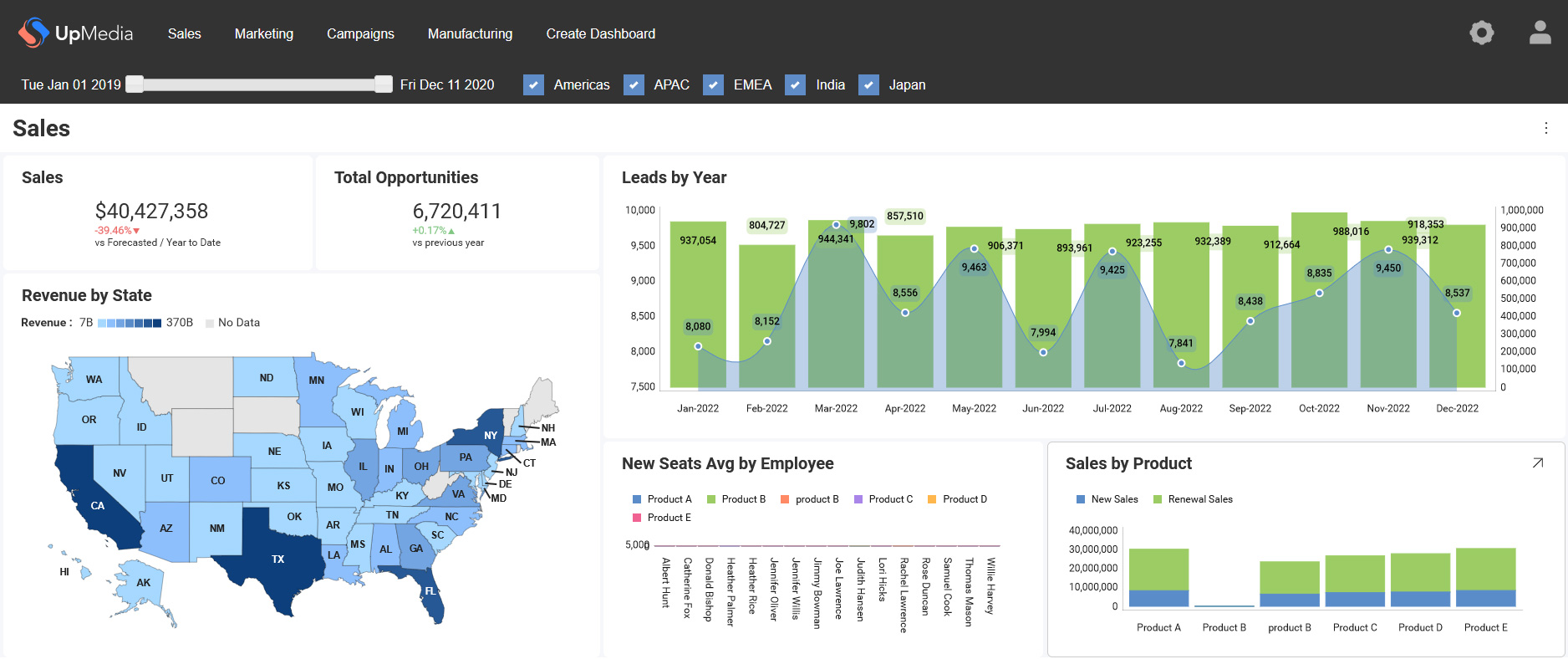



A maioria das integrações de análise começa da mesma maneira. Uma equipe de produto precisa de dados dentro de seu aplicativo. Alguém incorpora um painel por meio de um iFrame. Ele é lançado. Funciona, na maior parte. Os usuários podem ver gráficos sem sair do produto.
Então chega a primeira solicitação de personalização. Um cliente quer que o painel corresponda exatamente à sua marca. Outro precisa de filtros que respondam ao que o usuário está fazendo no momento no aplicativo. Alguém pergunta se os usuários podem fazer perguntas em linguagem natural em vez de navegar pelos relatórios. E a equipe de engenharia começa a perceber que o iFrame foi uma solução paliativa, não uma base.
Uma API de análise é o que está por trás de uma experiência de análise incorporada bem construída. É o que permite que a análise se comporte como uma parte nativa do seu produto — respondendo ao contexto do aplicativo, respeitando as permissões dos usuários, servindo insights gerados por IA e escalando por milhares de inquilinos sem se tornar um fardo de manutenção.
Este guia explica o que são as API de análise, como elas funcionam e o que muda quando você constrói sobre elas em vez de ao seu redor.
O Que É Uma API de Análise?
Uma API de análise é um conjunto de endpoints e protocolos que permitem que os aplicativos acessem, incorporem e interajam com recursos de análise de forma programática. Em vez de direcionar os usuários a uma ferramenta de painel externa, o aplicativo faz chamadas de API para recuperar dados, carregar visualizações, aplicar filtros e retornar insights — tudo dentro da interface do produto.
Uma API de análise transforma a análise em uma função que seu aplicativo chama — não em um destino para o qual seus usuários navegam.
Para as equipes de produto e engenharia, essa mudança tem implicações concretas. A análise que é executada por meio de uma API pode ser acionada por ações do usuário, delimitada a um contexto específico, filtrada pelas permissões do usuário atual e conectada a sistemas de IA — tudo isso sem exigir que o usuário faça nada além de continuar usando seu produto.
O contraste com os painéis incorporados tradicionais é arquitetônico, não cosmético. Um iFrame carrega a interface de uma ferramenta externa dentro do seu produto. Uma API de análise integra a análise à lógica do seu aplicativo — o que significa que você controla a interface, o modelo de acesso aos dados e o comportamento, não o fornecedor de análise.
Como as API de Análise Funcionam
Uma API de análise recebe uma solicitação do seu aplicativo, a processa por meio de um mecanismo de análise e retorna um resultado estruturado. A solicitação pode ser tão simples quanto “me dê essa métrica para esse usuário” ou tão complexa quanto “execute esta consulta neste conjunto de dados, aplique estes filtros e retorne o resultado como um componente de gráfico”.
O fluxo de solicitação
Em um nível funcional, cada interação com uma API de análise segue o mesmo padrão:
- Seu aplicativo envia uma solicitação — uma consulta, uma instrução de carregamento de painel, um parâmetro de filtro ou uma pergunta em linguagem natural
- A API processa a solicitação — autenticando o usuário, aplicando as regras de acesso aos dados, executando a consulta
- O mecanismo de análise recupera os dados — dos seus bancos de dados, data warehouses ou APIs conectados
- O resultado é retornado ao seu aplicativo — como dados estruturados, um componente renderizado ou um insight gerado por IA
- Seu aplicativo renderiza a saída — usando seus próprios componentes de interface ou o SDK de análise
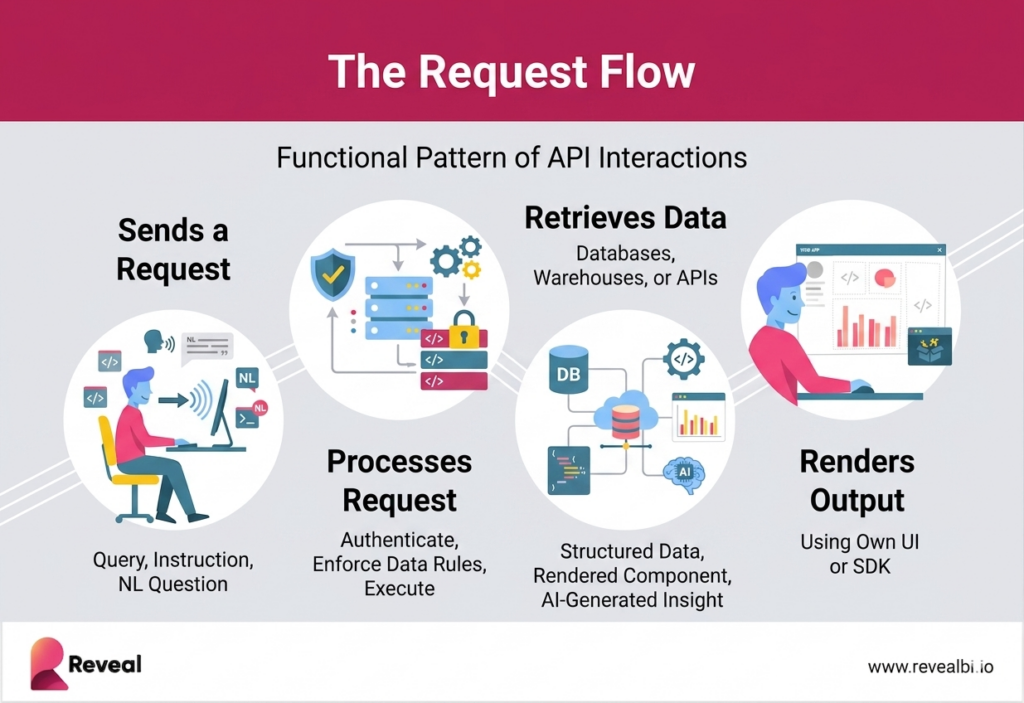
O que torna isso diferente de uma incorporação de painel estático é que cada etapa é governada pelo contexto do seu aplicativo. A identidade do usuário, sua função, seu inquilino, seu estado atual de fluxo de trabalho — tudo isso é passado pela API e molda o que é retornado. A análise se torna responsiva ao produto, não apenas disponível ao lado dele.
Principais recursos da API
- Endpoints de consulta de dados — recuperam dados brutos ou agregados com base em métricas e dimensões
- Endpoints de painel e visualização — carregam ou geram gráficos dinamicamente dentro do aplicativo
- Filtragem e detalhamento (drill-down) — aplicam o contexto do usuário, parâmetros e interações de forma programática
- Autenticação e controle de acesso — aplicam permissões antes que qualquer dado seja retornado
- Manipulação de dados em tempo real e em cache — suportam consultas ao vivo ou respostas otimizadas para desempenho
- Endpoints de IA e conversacionais — traduzem a linguagem natural em consultas e retornam insights estruturados
API de Análise vs. Ferramentas de BI Tradicionais
As ferramentas de BI tradicionais são projetadas para que as equipes de dados e os analistas explorem dados por meio de painéis e relatórios. Uma API de análise muda esse modelo para um em que a análise incorporada é executada dentro do aplicativo — solicitada, processada e entregue como parte da experiência do produto, em vez de como um destino separado.
A lacuna prática aparece quando uma equipe de produto tenta fazer algo para o qual o BI tradicional não foi projetado: responder ao contexto do usuário em tempo real, aplicar o isolamento de dados em nível de inquilino no nível da consulta, integrar-se a sistemas de IA ou construir uma experiência que pareça e se comporte como se tivesse sido criada pelos próprios engenheiros da equipe de produto.
| BI Tradicional | API de Análise | Por Que Isso Importa | |
|---|---|---|---|
| Modelo de acesso | Painéis externos | Incorporado no aplicativo | Os usuários nunca saem do seu produto para encontrar dados |
| Interação | Exploração manual | Acesso programático | A análise pode ser acionada por fluxos de trabalho, não apenas por usuários |
| Controle da interface | Fixo, definido pela ferramenta | Totalmente personalizável | Corresponde exatamente ao sistema de design do seu produto |
| Integração | iFrame ou complemento | SDK nativo + API | Sem limite para a personalização ou a profundidade da interação |
| Entrega de dados | Relatórios pré-construídos | Consultas sob demanda | Resultados em tempo real com base no contexto atual do usuário |
| Automação | Limitada | Orientada por API | Impulsiona alertas, gatilhos e ações orientadas por IA |
A linha mais importante dessa tabela é a última. As ferramentas de BI tradicionais não foram projetadas para o consumo por IA, elas foram projetadas para analistas humanos. Uma API de análise, por outro lado, é estruturada para acesso programático, o que significa que os sistemas de IA podem consultá-la, interpretar os resultados e gerar insights por meio da mesma camada que impulsiona o restante da experiência de análise. Essa é a arquitetura que torna possível a análise conversacional.
Tipos de API de Análise
As API de análise não são uma única interface. Uma camada de análise completa inclui vários tipos de API que lidam, cada um, com uma parte específica da experiência — desde a recuperação de dados até a visualização e a interação com IA. Entender qual tipo faz o quê importa quando você está avaliando plataformas ou projetando sua própria arquitetura de análise.

1. API de Consulta de Dados
As API de consulta de dados recuperam dados brutos ou agregados com base em métricas e dimensões definidas. Elas são a base; todos os outros tipos de API de análise dependem, em última análise, das API de consulta de dados para obter o que precisam.
- Impulsionam a lógica de análise do backend e as consultas personalizadas em todos os conjuntos de dados
- Aplicam agregações, agrupamentos, filtros e ordenações de forma programática
- Retornam dados estruturados que as camadas de visualização ou de IA podem consumir
Quando usá-las: sempre que seu aplicativo precisar recuperar dados para qualquer finalidade — gráficos, tabelas, painéis, resumos gerados por IA ou pipelines de relatórios automatizados.
2. API de Visualização
As API de visualização controlam como os dados são apresentados dentro do seu aplicativo. Elas renderizam gráficos, painéis e componentes visuais com base nas respostas da API e na configuração do seu aplicativo.
- Geram gráficos e painéis dinamicamente a partir dos resultados das consultas de dados
- Controlam o layout, a formatação e a lógica de exibição por meio do código do seu aplicativo
- Conectam as saídas de dados aos componentes de frontend no seu sistema de design
Quando usá-las: quando você precisa que a camada de renderização da análise seja impulsionada pela lógica do seu aplicativo — função do usuário, contexto atual, configuração do inquilino — e não codificada de forma rígida em um modelo de painel.
3. API de Análise Incorporada
As API de análise incorporada entregam a experiência de análise completa dentro do seu produto — não apenas a recuperação ou visualização de dados, mas toda a camada de análise dentro do produto. Elas combinam acesso a dados, renderização, controle de white-label, multilocação e segurança em uma interface unificada.
- Impulsionam experiências de análise dentro do produto totalmente com a sua marca
- Aplicam o isolamento de dados multilocatário no nível da consulta
- Suportam a implantação de white-label em cores, fontes e comportamento da interface
- Mantêm uma lógica consistente entre o acesso aos dados, as regras de negócio e a apresentação
Quando usá-las: quando a análise é um recurso central do produto que precisa parecer e se comportar como se tivesse sido criado pela sua própria equipe.
4. API de Análise Conversacional
As API de análise conversacional são onde a arquitetura se torna genuinamente nova. Elas traduzem a entrada em linguagem natural em consultas estruturadas, executam essas consultas nos seus dados e retornam os resultados como texto, métricas ou saída visual — permitindo que os usuários interajam com a análise por meio da conversa, em vez da navegação.
- Convertem perguntas em linguagem natural em consultas de dados
- Retornam resumos de KPI, explicações contextuais e saídas visuais
- Suportam perguntas de acompanhamento e análise iterativa
- Habilitam experiências de análise baseadas em chat dentro do seu produto
Isso é abordado em profundidade na próxima seção, porque as dimensões de governança e controle de custos das API conversacionais são frequentemente negligenciadas, e elas importam significativamente para as implantações em produção.
O Que É Uma API de Análise Conversacional e O Que Governança Realmente Significa?
Uma API de análise conversacional permite que os usuários ou sistemas de IA interajam com os dados por meio da linguagem natural. Um usuário faz uma pergunta. A API a traduz em uma consulta estruturada. A consulta é executada na sua infraestrutura de dados. O resultado retorna como texto, um gráfico, um resumo ou uma recomendação — dentro do seu produto, sem que seja necessária qualquer navegação por painéis.
A mudança: a análise se torna acessível por meio da conversa, não da navegação. Os usuários não precisam saber qual painel olhar. Eles perguntam o que querem saber.
O fluxo básico é simples. O que é menos simples — e o que a maioria das descrições de análise conversacional pula — é o que precisa ser verdade para que isso funcione com segurança em um produto SaaS multilocatário.
O problema de governança que a maioria dos fornecedores não aborda
Quando a IA gera consultas dinamicamente, com base na entrada em linguagem natural de usuários que você não controla, surgem três riscos que não existiam com os painéis estáticos:
- Vazamento de dados entre inquilinos. Se a camada de IA não for delimitada ao contexto do inquilino do usuário antes de executar uma consulta, um usuário da Empresa A poderia potencialmente receber dados que pertencem à Empresa B. Isso não é hipotético — é um modo de falha que já ocorreu em implantações de IA em produção.
- Custos de tokens descontrolados. A análise conversacional impulsionada por LLM pode gerar custos de API significativos e imprevisíveis se o uso de tokens não for governado. Um usuário que faz perguntas complexas e de várias etapas pode gerar ordens de magnitude mais chamadas de LLM do que o carregamento de um painel padrão. Sem controles, isso aparece como uma fatura surpresa.
- Respostas que contradizem suas políticas de governança de dados. Um modelo de IA operando fora da sua camada semântica pode gerar respostas tecnicamente coerentes, mas factualmente erradas — resumindo métricas que não existem, combinando dimensões que não deveriam ser combinadas ou apresentando resultados que entram em conflito com a forma como seu produto define termos-chave.
Uma API de análise conversacional pronta para produção aborda todos os três:
- A delimitação por inquilino é aplicada antes da execução, não depois. Cada consulta gerada pela camada de IA carrega o contexto do inquilino do usuário como um parâmetro não opcional.
- O uso de tokens é controlado e previsível. A exposição de custos é limitada no nível da plataforma, não deixada para variar com o comportamento do usuário.
- A IA opera dentro da camada semântica. Definições de métricas, dimensões aprovadas e regras de governança são incorporadas ao que a IA pode consultar — não contornadas pela entrada em linguagem natural.
A diferença entre uma demonstração de análise conversacional e uma implantação de análise conversacional é se esses controles existem. As plataformas que acoplam a IA a uma camada de análise existente normalmente abordam a governança como uma reflexão tardia. As plataformas construídas com uma abordagem API-first, onde a IA é um consumidor da mesma camada de dados governada, lidam com a governança de forma estrutural.
Veja como o Reveal AI lida com a governança.
Principais Componentes de Uma Arquitetura de API de Análise
Uma API de análise não opera isoladamente. Ela se apoia sobre uma arquitetura em camadas, onde cada componente lida com uma responsabilidade específica. Entender as camadas importa quando você está avaliando plataformas — porque uma lacuna em qualquer camada se torna um problema em produção.
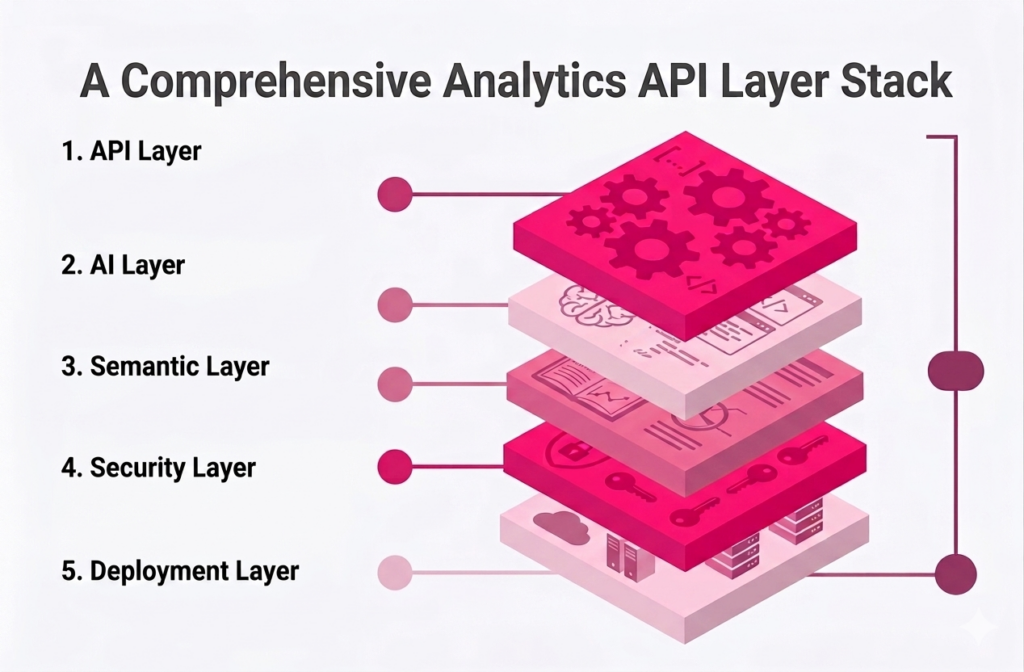
Camada de API
A camada de API expõe os endpoints que seu aplicativo chama — para consultas, painéis, filtros e interações de IA. Ela é a interface entre seu produto e tudo o que está abaixo dele. Uma camada de API bem projetada abstrai a complexidade da infraestrutura de dados subjacente, de modo que o código do seu aplicativo permaneça limpo e consistente em todos os casos de uso.
Camada Semântica
A camada semântica define o que as métricas e dimensões significam — e aplica essas definições de forma consistente em cada consulta. Sem ela, “receita” em um painel pode significar algo diferente de “receita” em outro, porque consultas diferentes acessam tabelas diferentes com lógicas diferentes. A camada semântica evita isso. Ela é a única fonte de verdade para a lógica de negócio, e é o que torna as consultas geradas por IA confiáveis — porque a IA só pode trabalhar com as definições que a camada semântica aprova.
Camada de IA
A camada de IA traduz a entrada em linguagem natural em consultas estruturadas que a camada de API pode executar. Em um sistema bem arquitetado, a camada de IA não contorna a camada semântica — ela opera sobre ela. É isso que torna a análise conversacional governável: a IA só pode fazer perguntas usando as métricas e dimensões que a camada semântica define, delimitadas aos dados que o usuário tem permissão para acessar.
Camada de Segurança
A camada de segurança controla quem pode acessar quais dados, aplicada no nível da consulta em vez do nível da interface. Isso inclui autenticação baseada em token ou OAuth, controle de acesso baseado em função e isolamento de dados em nível de inquilino. A distinção crítica: a segurança aplicada na camada de interface (mostrando ou ocultando elementos) pode ser contornada. A segurança aplicada na camada de consulta não pode — nenhuma consulta retorna dados que o usuário não tem permissão para ver. Veja a arquitetura de segurança do Reveal
Camada de Implantação
A camada de implantação determina onde e como a análise é executada — nuvem, híbrida ou on-premises. Para empresas SaaS em setores regulamentados, ou aquelas com clientes corporativos que têm requisitos de residência de dados, a flexibilidade de implantação não é uma solicitação de recurso — é um requisito contratual. Uma arquitetura de API de análise que suporta apenas a implantação em nuvem é um fator desqualificador para uma parcela significativa do mercado corporativo.
Casos de Uso de API de Análise em Produtos SaaS
O benefício abstrato das API de análise — a análise como parte do produto, e não ao lado dele — se torna concreto quando você observa as coisas específicas que elas permitem e que as abordagens de BI tradicionais não conseguem.
Análise de produto voltada para o cliente
As equipes SaaS usam API de análise para incorporar painéis, métricas e exploração de autoatendimento diretamente em seus aplicativos. Cada cliente vê seus próprios dados, em tempo real, sem sair do produto — e sem que a equipe de engenharia construa uma camada de análise personalizada do zero. A API lida com o acesso aos dados, o SDK lida com a renderização e a equipe de produto controla a experiência.
Análise multilocatário em escala
As API de análise permitem o isolamento seguro de dados entre centenas ou milhares de clientes em uma plataforma compartilhada. Cada chamada de API carrega o contexto do inquilino que delimita quais dados são retornados — o que significa que adicionar um novo cliente não exige a criação de um novo ambiente, apenas o provisionamento dentro da arquitetura existente. Essa é a diferença entre uma análise que escala com o seu negócio e uma análise que exige trabalho de infraestrutura sempre que você assina um novo contrato corporativo.
Insights dentro do produto orientados por IA
Quando a análise é executada por meio de uma camada de API que os sistemas de IA podem acessar de forma programática, a análise conversacional se torna possível. Os usuários fazem perguntas, a IA gera consultas na camada de dados governada e os resultados retornam como respostas — dentro do produto, delimitados ao inquilino e à função do usuário. Essa é a arquitetura que impulsiona a consulta em linguagem natural, o afloramento automatizado de insights e os resumos gerados por IA sem exigir uma ferramenta de IA separada ao lado do seu produto.
Análise integrada ao fluxo de trabalho
As API de análise podem ser chamadas pela lógica do aplicativo, não apenas por interações do usuário. Isso permite que a análise seja incorporada aos fluxos de trabalho: um gatilho dispara quando uma métrica cruza um limite, um relatório automatizado é gerado quando um processo é concluído, um alerta é enviado quando anomalias são detectadas. A análise se torna parte de como o produto funciona, não apenas o que os usuários olham quando querem revisar o desempenho.
O Que Quebra Sem Uma API de Análise
A maioria dos desafios que as equipes enfrentam com as integrações de análise remonta à mesma causa raiz: a análise foi tratada como um problema de interface em vez de um problema de arquitetura. A incorporação por iFrame, as ferramentas de BI autônomas e os painéis construídos sob medida, todos resolvem a necessidade imediata de tornar os dados visíveis para os usuários. Eles não resolvem o problema subjacente de a análise operar como uma parte nativa do produto.
Padrões comuns de falha
- Multilocação na camada de interface. Filtrar painéis por inquilino na interface em vez de aplicar o isolamento no nível da consulta. Funciona até que não funcione mais — e quando falha, falha com os dados de um cliente visíveis para outro cliente.
- Teto de personalização do iFrame. A primeira versão é lançada rapidamente. A segunda versão exige soluções paliativas. Na terceira iteração, a equipe de engenharia está mantendo uma pilha crescente de gambiarras para fazer o iFrame se comportar como parte do produto.
- Métricas que significam coisas diferentes. Sem uma camada semântica, consultas diferentes calculam a mesma métrica de forma diferente. Dois painéis mostram números de receita diferentes. Segue-se um escalonamento por parte de um cliente.
- IA que não pode ser governada. Adicionar recursos de IA a uma camada de análise que não foi construída para isso cria exposição: vazamento de dados, imprevisibilidade dos custos de tokens e respostas de IA que contradizem o modelo de dados do produto.
- Escalabilidade que exige trabalho de infraestrutura. Cada novo cliente corporativo aciona um processo de provisionamento porque a arquitetura de análise não foi construída para a escala multilocatário.
Como o Reveal Implementa as API de Análise
O Reveal é construído como uma camada de análise API-first para produtos SaaS e ISVs — o que significa que a análise se integra à lógica do aplicativo em vez de ficar ao lado dele como um sistema separado. A camada de API, o SDK, a camada semântica e os recursos de IA são componentes conectados de uma única arquitetura, não ferramentas separadas que precisam ser feitas para funcionar juntas.
Como isso se parece na prática:
- Seu aplicativo chama as APIs do Reveal para carregar painéis, consultar dados e acionar insights de IA — usando o mesmo modelo de autenticação que seu produto já usa
- O SDK renderiza componentes de análise dentro do seu produto usando seu sistema de design — sem iFrame, sem interface externa vazando
- O isolamento de dados multilocatário é aplicado no nível da consulta — o contexto do inquilino não é opcional em nenhuma chamada de API
- O Reveal AI opera dentro da camada de dados governada — as consultas em linguagem natural são delimitadas ao inquilino e à função do usuário antes da execução
- Os custos de tokens são controlados no nível da plataforma — não sujeitos a um uso ilimitado de LLM
- A implantação é executada onde seus dados precisam estar — nuvem, híbrida ou totalmente on-premises
A Scriptly, uma plataforma SaaS que atende farmácias independentes, incorporou a API de análise e o SDK do Reveal em seu produto em uma semana. Seus clientes agora acessam tendências de prescrição em tempo real e dados de estoque dentro da plataforma Scriptly — delimitados aos dados de cada farmácia, sob a marca da Scriptly, sem nenhuma ferramenta externa na experiência. O recurso se tornou um diferencial mensurável nas conversas de vendas. Leia a história da Scriptly